
Gaming Room Design and Storage
Are you a gamer with a sizeable collection of gaming equipment? Then you’ve probably started to run into a space and organization problem. First, the space you’re using (e.g., the living room or extra bedroom) is probably a morass of consoles, wires, controllers, games, and other gaming paraphernalia. Second, it’s most likely scattered about in a haphazard way, making for a very cluttered look and a very unhappy spouse.
Now, imagine a space that is designed specifically for your gaming. A space that is easy to manage and organize, but that looks cool. But what would it take to have such a space? Just a little planning and creativity.
Choice of Room
The first thing you’ll want to take into consideration is which room you’re going to use for your gaming headquarters. This will determine the type of storage that you’ll need to get. For instance, if you plan to use part of your living or family room, this will impact the type of storage you get. Most likely, you’ll want a storage solution that hides the gaming equipment and games when not in use.
On the flip side, maybe you’ve dedicated a special room like an extra bedroom or a rec room to be gaming central. In this case, it might not be as important to hide your consoles, but you’ll still want a storage arrangement that is organized and attractive.
Other Considerations
Electrical Hookups
Another factor to consider is the room’s access to electrical outlets. You’ll want to position your gaming storage center on the wall that has the most outlets. It may be a good idea to analyze the number of devices on the circuit you plan on using to determine if there is enough room left to add your gaming consoles, television, and other equipment.
Comfort
You’ll want to choose a room that allows for maximum comfort. This means a room that is large enough to support the type of seating you want, whether that is just a large sofa or recliner, or true gaming seats. To do it right, you’ll want to place this seating at an optimal distance from your gaming monitor or television. Rtings.com has a cool slider that helps you decide the correct distance you should be from your television.
Equipment Cooling
The room you choose should be a place that accommodates the large amount of heat that your gaming equipment generates. Make sure the room has adequate ductwork to deliver air conditioning to the room and that there is enough space behind the shelving to allow for a free flow of air. If you don’t have air conditioning, choose a room that has a window that can be opened as well as room for fans to be set up.
SoundProofing
Maybe not everyone in your house is gamer and doesn’t want to hear your game or you screaming at the game. So, it’s important to factor in a level of soundproofing to your room. This can be done in a low-tech way by adding soft furniture, rugs, and curtains to your room. Some of the sound will be absorbed by these items. You may want to hang tapestries or heavy moving blankets on the walls to further dampen the sound. If that’s not getting the job done (your significant other is yelling at you to “turn it down!”) then consider installing acoustic foam tiles or fabric panels specifically designed to absorb soundwaves.
Lighting
Lastly, the room should have the kind of lighting you want. If you have a room with several windows, you’ll want to invest in blackout curtains to get the room dark. If you have chosen a room with little or no natural light, choose lighting that can be adjusted with a dimmer, or even multi-colored lighting that can be changed depending on the mood of the game you’re playing.
Gaming Console Storage Choices
Now that you’ve decided where you want your gaming pleasure dome to be, you can concentrate on the type of storage system you’ll want. This can be something that you either build or buy, but it has to accomplish the main functions you want it to – namely storing your consoles, pcs, and games in a way that is pleasing to your eye and readily available when you are.
Exposed Storage
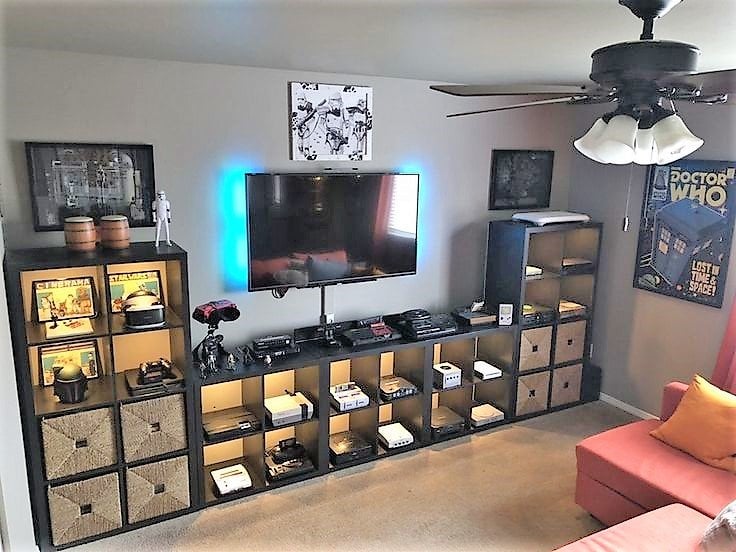
Probably the easiest solution is to get a shelving system that has compartments for each device as well as compartments for your games.
An example of this is the one below.
If you like the easy access this type of entertainment center allows, but you want to dress it up a little bit, consider adding backlights to the shelves like this.
Or this:
Enclosed Gaming Console Storage
If you plan on gaming in a common area like a living or family room and need a way to keep your gaming consoles and games hidden, something like this would be a good solution.
Combination Exposed/Enclosed Gaming Storage
If you want the best of both worlds, where you have access to your consoles when you want them, but want a way to hide the hundreds of games you have, these solutions below might work for you:
Or this:
Gaming is meant to be enjoyed. So, you’ll want to create an atmosphere of comfort and style that works for you and for the rest of your family. Hopefully, these ideas will get you on your way to creating the gaming environment of your dreams!

About the Author: Derek Hines
Digital Marketing Specialist
Derek is originally from the great state of Wisconsin (go Badgers), but is slowly becoming a Pacific Northwesterner. As part of the Digital Marketing team, he writes extensively on storage, moving and life for West Coast Self-Storage, based in Everett, Washington.